NANCY COOPER
RELATIONSHIPS + IDENTITY + STANDARDS
Support FAQ's
How do I manage/cancel my subscription?
On Mobile:
1. Go to thenancycooper.com.
2. Tap the menu icon.
3. Select Portal.
4. Sign in to the Inner Alchemy Portal using your email/password, Google login, or secure-code option.
5. Once logged in, tap the profile icon with your initials or photo in the upper-right corner.
6. Tap Profile Settings.
7. On the Profile page, tap the back arrow next to “Profile.”
8. This opens the main account settings page.
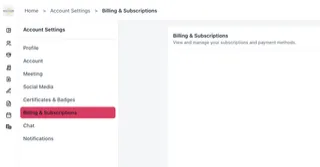
9. Tap Billing & Subscriptions.
10. From there, locate the active subscription they want to cancel and use the available cancellation/manage-subscription option.
On Desktop:
1. Go to thenancycooper.com.
2. Tap the menu icon.
3. Select Portal.
4. Sign in to the Inner Alchemy Portal using your email/password, Google login, or secure-code option.
5. Once logged in, tap the profile icon with your initials or photo in the upper-right corner.
6. On the left hand side locate Billing and Subscriptions.
7. From there, locate the active subscription they want to cancel and use the available cancellation/manage-subscription option.
NOTE: You may be asked to authenticate your account for safety reasons before being able to access or manage your billing preferences.
I don't recognize a subscription/recurring charge for $37.
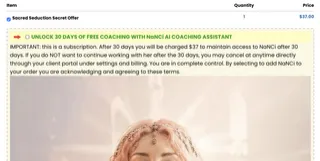
The Alysion Agency LLC and Nancy Cooper only offer one reoccurring charge at $37:
NaNCi, AI Coaching Assistant ($37): NaNCi is offered as a complimentary introductory offer for 30 days of free usage with the purchase of the Sacred Seduction program. It must be manually selected to be added and CANNOT be added without it being selected or without permission. If you are being charged a monthly reoccurring amount of $37, it is from when you selected to add the free trial of NaNCi to your order during checkout. You can manage your subscription at anytime by following the instructions on this page for how to cancel or manage subscriptions.
I purchased something but never received the email for access.
All purchase delivery has been automated to send your receipt and access to your program or booking link. If you did not receive the email, please check your JUNK, SPAM, or Promotions folder. If you still do not see it, please search for "Nancy Cooper" in your inbox. If after taking these steps and you still do not see the email, please [email protected] and we will send it over manually as a reply to your email.
Mark the email ‘Not Spam’ and add my sending address to contacts so future program emails are less likely to get filtered.
I purchased something but do not see it inside my client portal.
There are several purchases that are delivered via email only.
These include:
Secret Psychology of Masculine Devotion masterclass ($7)
Breakthrough Blueprint ($7)
If you did not receive the email for one of those, please follow the instructions above.
I purchased a reading but clicked away from the form and couldn't complete it.
No problem. The form is linked in the confirmation email. Be sure to check your spam or junk folder.
Mark the email ‘Not Spam’ and add my sending address to contacts so future program emails are less likely to get filtered.
The audio files are not playing for me inside my purchased program.
This often happens because of a security issue or setting on the device. All programs and lessons have been confirmed by Nancy Cooper and the software company support to be properly functioning and uploaded.
Try:
1. A different browser
2. A different device
3. Download the app from the App Store.
How can I tell whether I have an active subscription?
On Mobile:
1. Go to thenancycooper.com.
2. Tap the menu icon.
3. Select Portal.
4. Sign in to the Inner Alchemy Portal using your email/password, Google login, or secure-code option.
5. Once logged in, tap the profile icon with your initials or photo in the upper-right corner.
6. Tap Profile Settings.
7. On the Profile page, tap the back arrow next to “Profile.”
8. This opens the main account settings page.
9. Tap Billing & Subscriptions.
On Desktop:
1. Go to thenancycooper.com.
2. Tap the menu icon.
3. Select Portal.
4. Sign in to the Inner Alchemy Portal using your email/password, Google login, or secure-code option.
5. Once logged in, tap the profile icon with your initials or photo in the upper-right corner.
6. On the left hand side locate Billing and Subscriptions.


We are committed to providing an accessible website and do our best to maintain WCAG 2.2 AA standards. If you encounter a barrier please email us at [email protected] so we can assist and remediate it.
© 2026 Alysion Agency LLC. All rights reserved. | Privacy Policy | Terms of Use
Alysion Agency LLC is a coaching and education company founded by Nancy Cooper. Content shared is for informational and educational purposes only and does not constitute licensed mental health, legal, or financial advice. Nancy Cooper operates as a psychology-informed coach and is not a licensed mental health provider. By engaging her services, you acknowledge and accept that coaching is not a replacement for licensed professional treatment and should not be used as such. Individual results will vary.